How to Remove Crowds from Chhath Puja & Festival Photos Without Ruining Water Reflections
A complete step-by-step free AI workflow to erase bystanders from ghats and riverbanks while preserving realistic water ripple reflections. Includes English & Hindi guides.
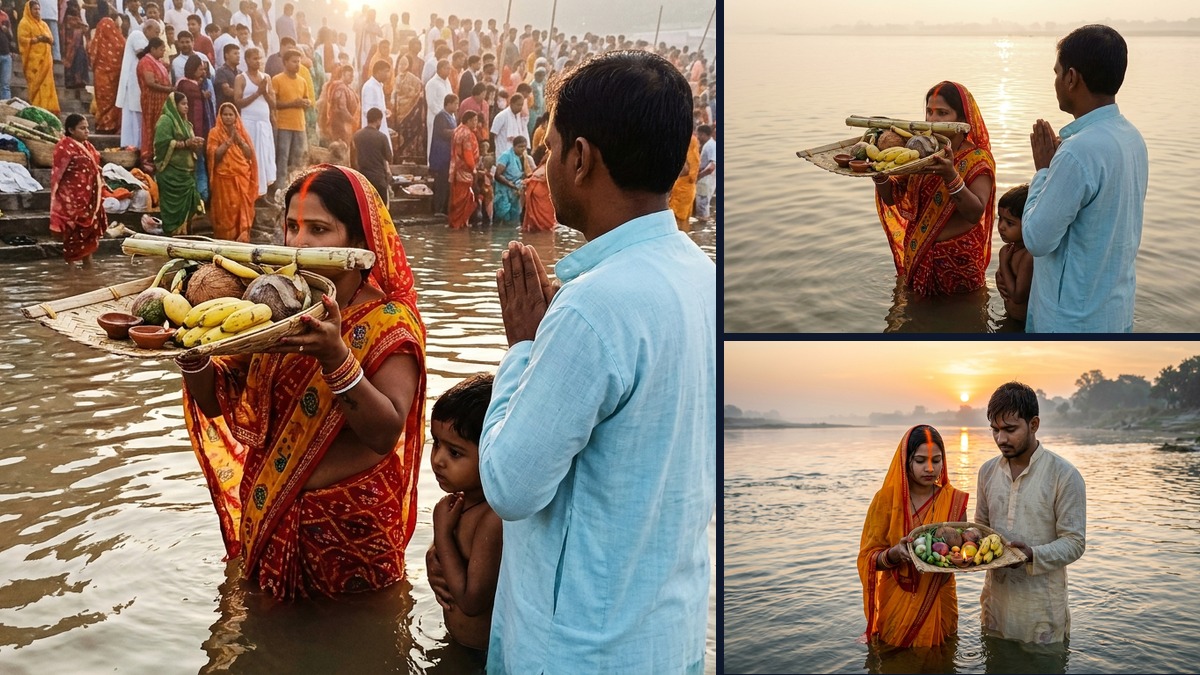
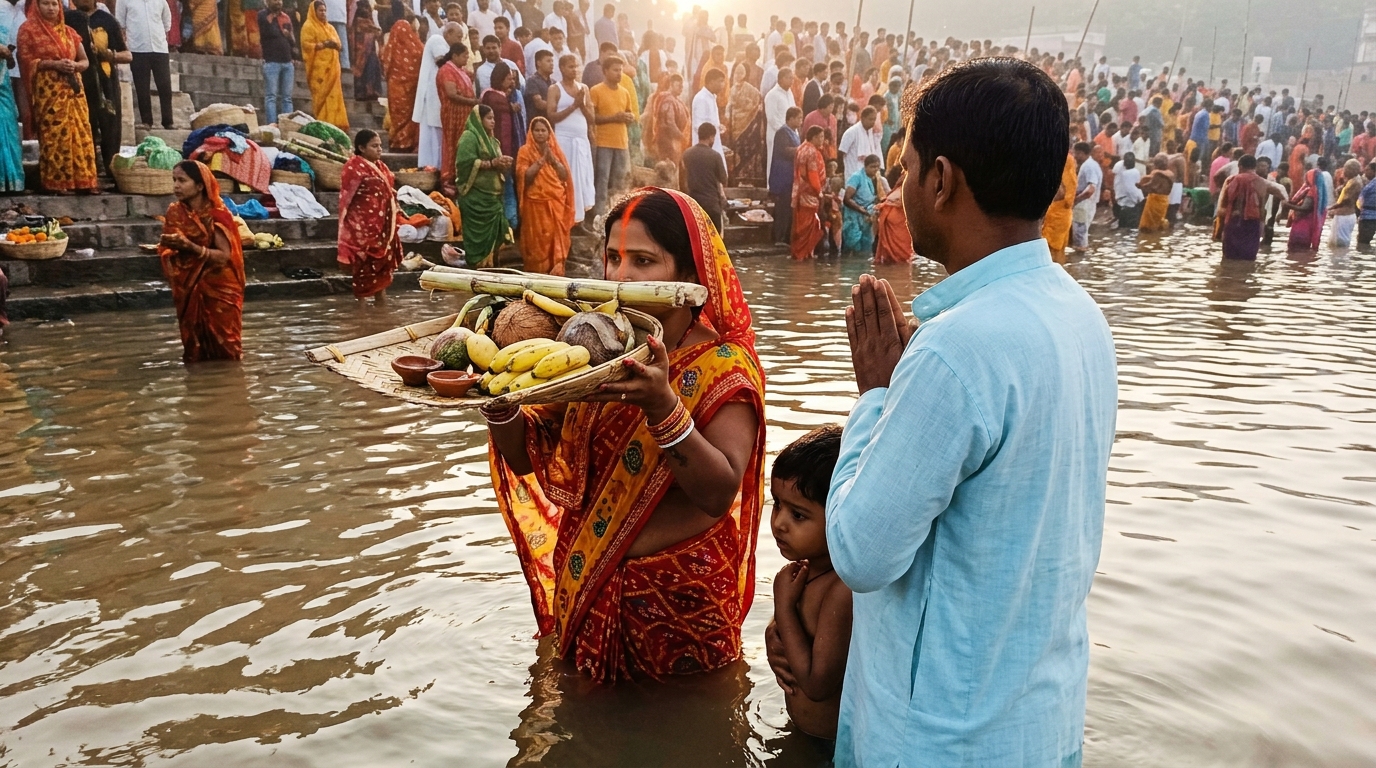
Issue: Background is densely crowded with festival bystanders, disturbing the sacred moment and reflections.
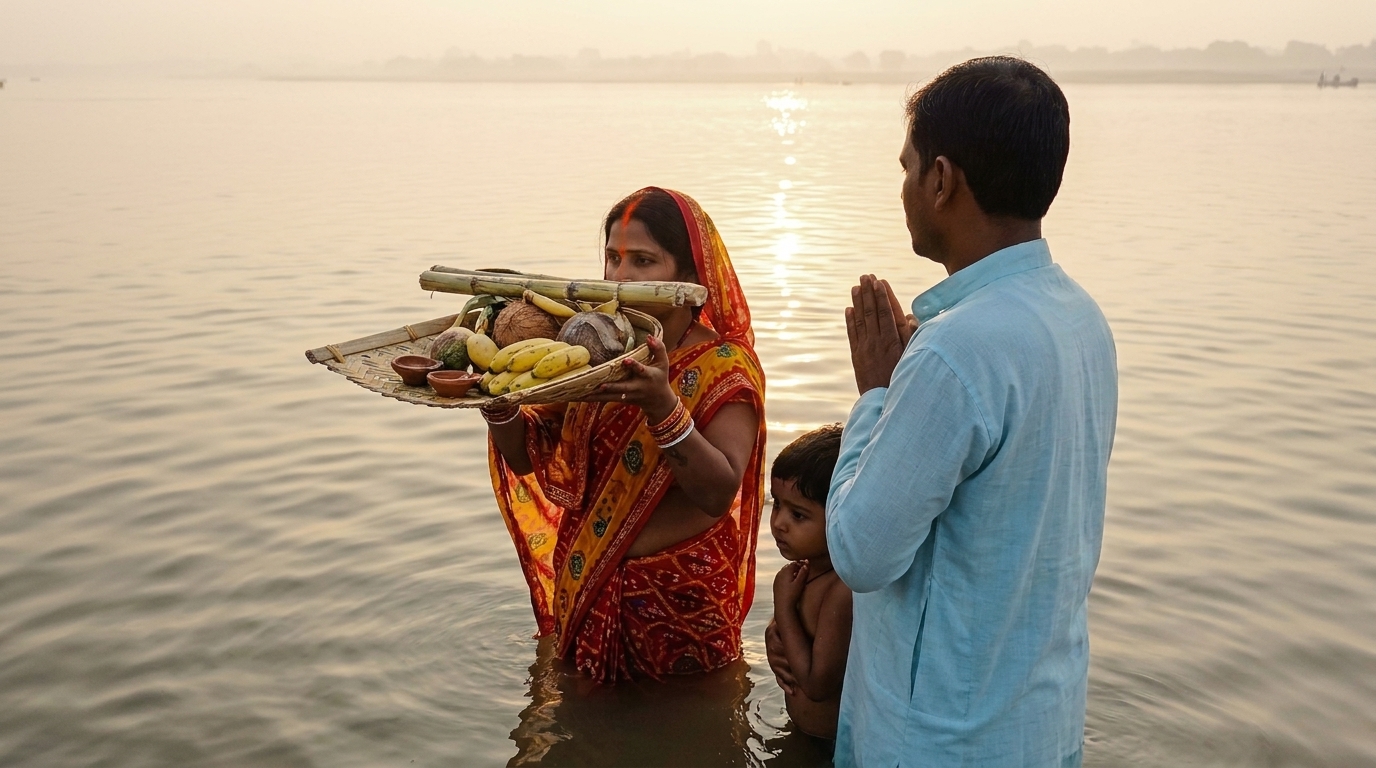
Result: Family remains 100% natural and sharp. River ripples and morning sun reflections flawlessly reconstructed.
Why Built-In Mobile Erasers Fail on Water
Whether you own a Samsung Galaxy, an iPhone with Apple Intelligence, or a Google Pixel, your phone’s built-in “Magic Eraser” works reasonably well on simple backgrounds—like a person on dry sand or against a blue sky.
However, during Chhath Puja, Ganga Aarti, or riverside family rituals, the background is flowing river water. Water presents two complex optical challenges that confuse simple algorithms:
- Fresnel Reflections: The surface mirrors the morning sky, distant temple lights, and the person’s own body.
- Specular Light Glints: Sunlight creates hundreds of micro-reflections across moving ripples.
When you brush over 10 bystanders in one swipe with a phone’s default eraser, it simply averages the surrounding colors. The result? A muddy, plastic-looking blur where the river looks like dirty grey concrete instead of sacred flowing water.
The 3-Step Free AI Multi-Pass Workflow
To achieve a photo you would proudly print and frame, we use a free, multi-pass inpainting workflow using tools like Clipdrop Cleanup (Free tier) or Lama Cleaner.
Step 1: Distance-First Isolated Masking
The number one mistake is lassoing all 15 background people at once. Doing that gives the AI zero clean reference pixels to reconstruct the river.
- Open your raw photo in Clipdrop Cleanup (web or mobile).
- Set your brush size to 24px–28px.
- Mask only the people furthest away on the horizon or distant ghat steps first.
- Click Clean. Because the AI has abundant water pixels in the foreground, it cleanly reconstructs the horizon line without any seam.
Step 2: The Water Reflection Compensation Mask (The Secret Trick)
This is where 99% of people fail. When someone stands waist-deep in water, their body casts a dark shadow and reflection downward into the ripples.
⚠️ Critical Rule: If you only erase the person’s torso and head, a dark “ghost reflection” will remain in the water. You MUST extend your selection brush downward into the water to cover both the person and their reflection.
By erasing the reflection together with the body, the AI pulls ripple patterns from the clean left and right sides of the river, connecting the waves seamlessly across the gap.
Step 3: Snapseed High-Frequency Texture Recovery
AI inpainting can occasionally leave a very subtle softness where the people used to be. We fix this in 10 seconds using the free Google Snapseed app on your smartphone:
- Open the cleaned image in Snapseed.
- Go to Tools > Details.
- Increase Structure to
+14and Sharpening to+6. - Use the Selective Brush to apply this sharpness only to the river water. Never sharpen faces, as that introduces harsh digital skin artifacts.
What to Do vs. What NOT to Do
- Remove 2 to 3 distant people per pass.
- Always mask down through the water reflection.
- Preserve the original RAW or full resolution image.
- Keep your family members in the foreground completely untouched.
- Never select the whole crowd in one single brush stroke.
- Don’t use built-in WhatsApp editors (they compress heavily).
- Never leave orphaned shadows floating in the water.
- Don’t over-sharpen people’s faces.
Final Verdict
You do not need an expensive graphic designer or complex desktop software to fix your sacred family moments. By using distance-first masking and covering water reflections, your Chhath Puja photos will look like a private, peaceful sunrise session.
मोबाइल का ‘Magic Eraser’ पानी वाली फोटो में फेल क्यों हो जाता है?
चाहे आपके पास Samsung हो, iPhone हो या Google Pixel, मोबाइल का इन-बिल्ट इरेज़र सूखी जमीन या सादे बैकग्राउंड पर तो ठीक काम करता है, लेकिन छठ पूजा या नदी घाट की फोटो में पूरी तरह फेल हो जाता है।
छठ पूजा के समय जब आप सुबह या शाम के अर्घ्य की फोटो लेते हैं, तो बैकग्राउंड में बहता हुआ पानी (नदी) होता है। पानी में दो चीजें होती हैं:
- सूरज की सुनहरी किरणों का रिफ्लेक्शन (Water Ripples): पानी की हर लहर पर धूप चमकती है।
- लोगों की परछाई (Reflections): जो लोग पानी में खड़े हैं, उनकी परछाई नीचे पानी में दिखाई देती है।
जब आप मोबाइल के आम इरेज़र से 10-15 लोगों को एक साथ मिटाते हैं, तो वह पानी की लहरों को मिटाकर वहां एक गंदा धुंधला (plastic smudge) धब्बा छोड़ देता है, जिससे फोटो पूरी तरह नकली लगने लगती है।
3-स्टेप में बिल्कुल फ्री AI तरीका (असली जैसा रिजल्ट)
बिना किसी पेड सॉफ्टवेयर के, अपने फोन या लैपटॉप पर Clipdrop Cleanup (फ्री टूल) का उपयोग करके एकदम असली फोटो बनाने का तरीका:
स्टेप 1: दूर खड़े लोगों को पहले हटाएं (Isolated Masking)
सबसे बड़ी गलती यह होती है कि लोग एक ही बार में ब्रश घुमाकर सभी 15-20 लोगों को सेलेक्ट कर लेते हैं। ऐसा करने से AI समझ नहीं पाता कि पानी की लहरें कहां से जोड़नी हैं।
- अपने फोन के ब्राउज़र में Clipdrop Cleanup खोलें और अपनी ओरिजिनल फोटो अपलोड करें।
- ब्रश का साइज 24px से 28px रखें।
- सबसे पहले केवल उन 2-3 लोगों को सेलेक्ट करें जो नदी में सबसे दूर या घाट की सीढ़ियों पर खड़े हैं।
- Clean पर क्लिक करें। क्योंकि आसपास साफ पानी मौजूद है, AI बिना किसी निशान के दूर की लहरों को जोड़ देगा।
स्टेप 2: पानी की परछाई वाला सीक्रेट तरीका (The Reflection Trick)
यह वो सीक्रेट है जो 99% लोगों को नहीं पता होता। जब कोई व्यक्ति पानी में खड़ा होता है, तो उसका शरीर ही नहीं, बल्कि पानी में उसकी काली परछाई भी होती है।
⚠️ सबसे जरूरी बात: अगर आप सिर्फ इंसान के शरीर को मिटाएंगे, तो पानी में उसकी परछाई तैरती रह जाएगी, जिससे फोटो तुरंत नकली दिखने लगेगी। आपको ब्रश को नीचे पानी में उसकी परछाई तक खींचकर पूरा सेलेक्ट करना है।
जब आप शरीर और परछाई दोनों को एक साथ मिटाते हैं, तो AI बाएं और दाएं दोनों तरफ की बहती लहरों को बीच में मिलाकर एकदम नेचुरल पानी तैयार कर देता है।
स्टेप 3: Snapseed से पानी की नेचुरल चमक वापस लाएं
AI से लोग हटाने के बाद कभी-कभी पानी हल्का सा स्मूथ (चिकना) दिखता है। इसे 10 सेकंड में ठीक करने के लिए Google के फ्री ऐप Snapseed का इस्तेमाल करें:
- साफ की हुई फोटो को Snapseed ऐप में खोलें।
- Tools > Details पर जाएं।
- Structure को
+14और Sharpening को+6पर सेट करें। - ब्रश टूल से यह इफेक्ट सिर्फ नदी के पानी वाले हिस्से पर लगाएं। चेहरे पर न लगाएं, ताकि चेहरा सॉफ्ट और नेचुरल रहे।
क्या करें और क्या न करें (Quick Checklist)
- एक बार में सिर्फ 2 से 3 लोगों को ही सेलेक्ट करें।
- पानी में उनकी परछाई को भी ब्रश से ढकें।
- फोटो की ओरिजिनल क्वालिटी (RAW/HD) ही इस्तेमाल करें।
- परिवार के मुख्य सदस्यों को बिल्कुल न छुएं।
- पूरी भीड़ पर एक ही बार में ब्रश न फेरें।
- WhatsApp पर भेजी हुई कंप्रेस फोटो से काम न करें।
- पानी में किसी की अधूरी परछाई न छोड़ें।
- चेहरे पर ज्यादा शार्पनिंग न करें।
लखन का निष्कर्ष (Lakhan’s Verdict)
पारिवारिक और धार्मिक त्योहारों की यादों को सहेजने के लिए किसी महंगे फोटो एडिटर को पैसे देने की जरूरत नहीं है। बस थोड़ी सी सावधानी, सही मास्किंग और परछाई को कवर करके आप ऐसी शानदार छठ पूजा फोटो बना सकते हैं जिसे आप घर में फ्रेम करवाकर लगा सकें।
Quick Answers
Is this workflow completely free, or do I need a paid plan?+
The core workflow uses free or freemium tools (like the ones named in this guide). Where a premium version helps, I say so explicitly so you can start at ₹0 and only upgrade if you need the extra quality.
Which app works best on a mid-range Android phone?+
On budget Android, the mobile-native tools (CapCut, Snapseed, VN) run best without lag. The desktop/browser AI tools give higher results but need a computer or decent phone, so match the tool to the hardware you actually have.
Will these results look "AI-ish" or fake to viewers?+
No — that's the whole point of the multi-pass approach. The key is to preserve natural texture, reflection, and physics (as explained in the steps above) rather than letting one aggressive pass wash everything out. Done right, it looks like the original scene.
More Guides & Reviews
3 Free AI Tools to Fix Grainy, Low-Light Wedding & Sangeet Videos on Your Phone
How to de-noise, upscale, and salvage dark, muddy wedding and party video clips directly on iOS and Android without paying for expensive desktop software. Dual English & Hindi guide.
Are Meta Ray-Ban Smart Glasses Worth It for Travel & Street Vlogging in India?
We tested the Meta Ray-Ban smart glasses across bustling Indian railway stations, street food markets, and night bazars. Honest dual English & Hindi review.
Chhath Puja Couple Photo AI Prompts: Free Workflow for Indian Festivals
How to craft realistic, respectful, and culturally accurate Chhath Puja young adult couple portraits using free AI tools without cartoon artifacts. Dual English & Hindi guide.

Diwali Low-Light Photo & Video AI Fix: Free Mobile Workflow
How to fix dark, grainy Diwali diya portraits and sparkler videos using free smartphone AI tools. Complete dual English & Hindi tutorial.